How Much of Your Company Should AI Run? (A 4-Step Test Before You Buy Another Tool)
Most owners ask which AI tool to buy. The better question is how much of each process should go to simple rules, how much to AI, and how much should stay with your people. Here is a four-step test to answer it, one process at a time, before you pay for another subscription.
Count the AI subscriptions your company has started this year. A chatbot for customer questions, a writing tool for marketing, something that promised to automate your sales. Now look at a normal Monday. The same people copy the same numbers into the same spreadsheet, the same approvals wait on your desk, and the same client emails sit there until you get to them.
If that sounds familiar, you are not behind on AI. You bought tools before you decided what each one was for.
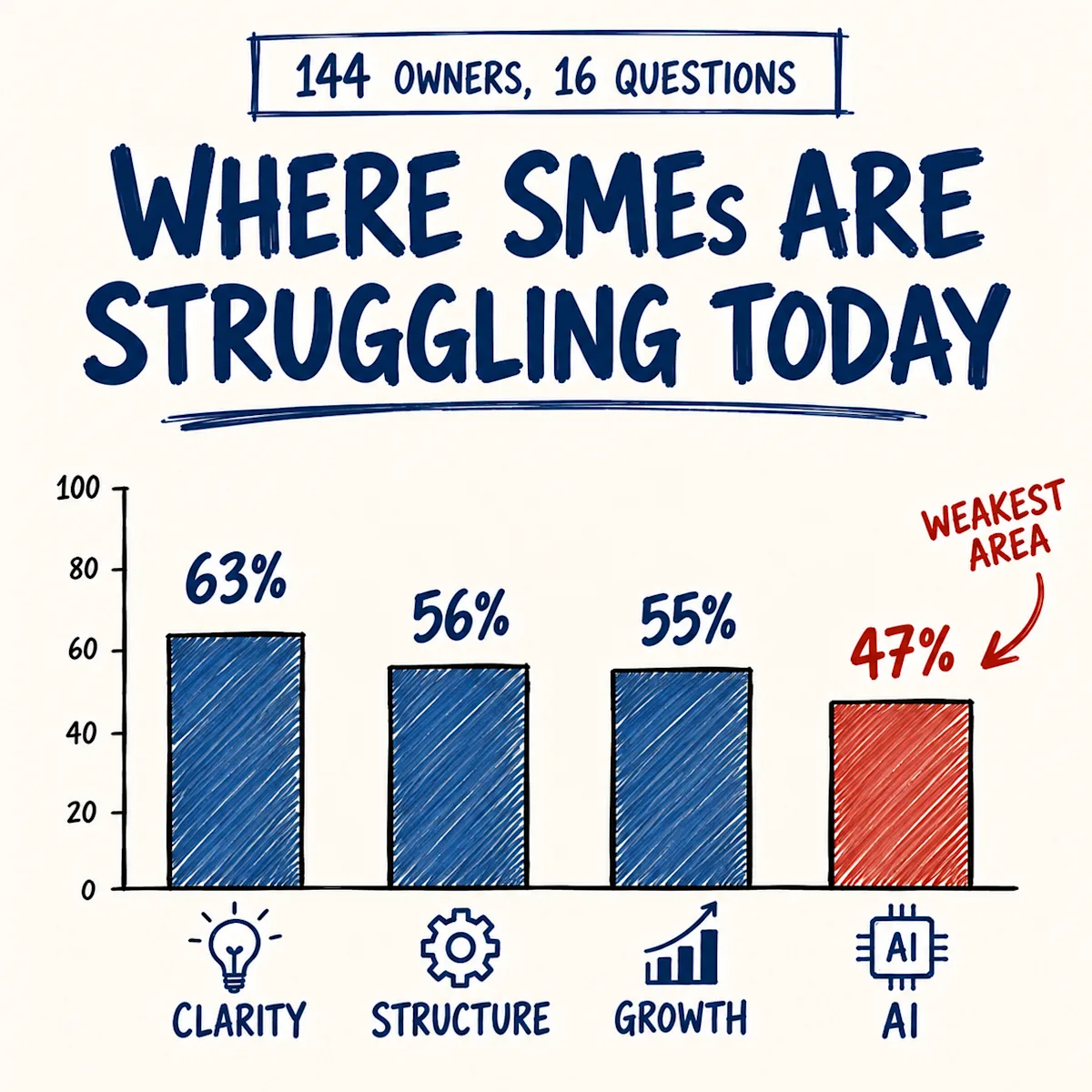
You are also far from alone. In less than two months, since 23 July, 144 owners have taken our free business health check, most of them running companies of one to ten people. AI came out as their weakest area by a distance: an average of 47 out of 100, against 55 for growth, 56 for structure and 63 for clarity. These owners are not short of tools. What they are missing is an order to put them in.
The question to ask instead
"Which AI should we use?" has no good answer, because it skips the real decision. The useful question is this one:
For each process in your company, how much should be done by simple rules, how much by AI, and how much by your people?
The answer is different for every process, and you can work it out with simple arithmetic. Start with all the work in one process. Take out what simple rules can do. Take out what AI can do. What is left is your people's job.
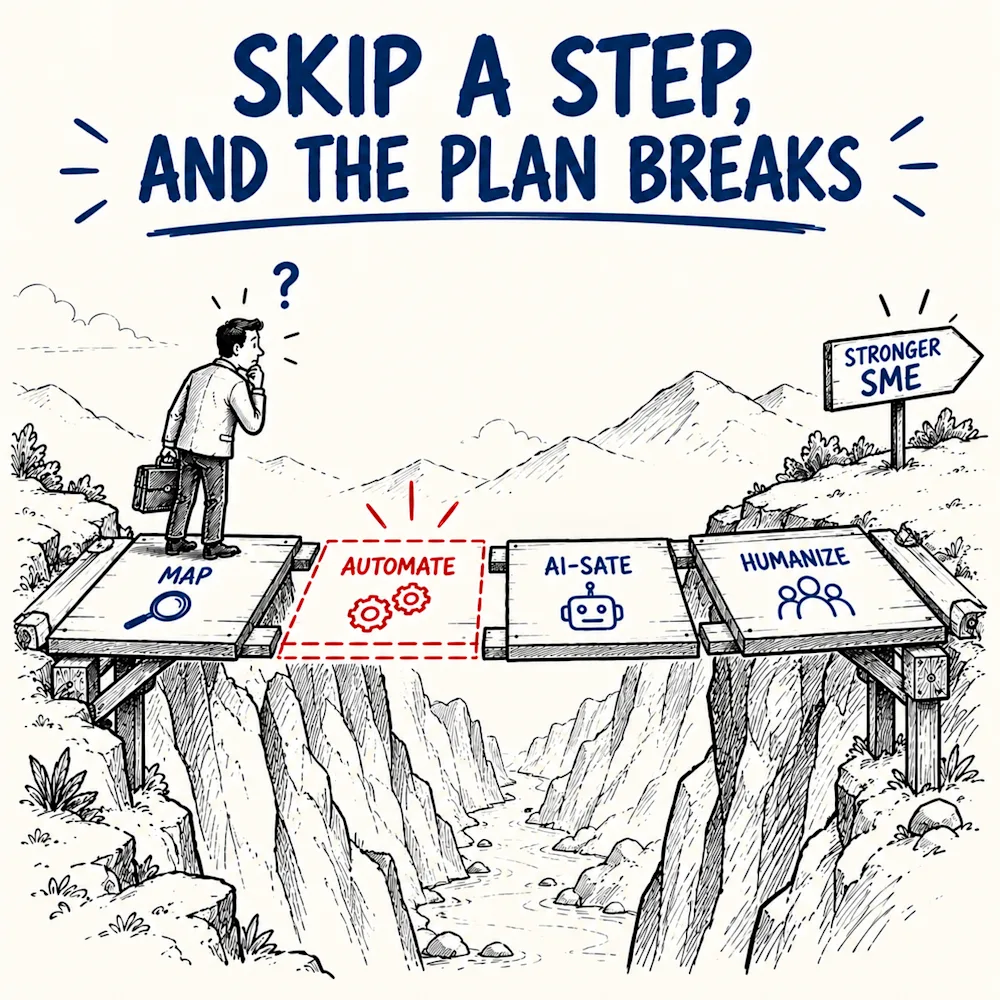
It runs in four steps, and the order matters. In May I wrote up the full AI-isation framework for founders. This piece is the practical test that sits underneath it.
Step 1: Draw the work before you buy anything
Take one process that eats time every week: sales follow-up, invoicing, onboarding a new client. Sit down with the people who actually do it and draw it on paper or a whiteboard, step by step. Who does what, where the work passes from one person to the next, where it waits.
This is where owners get surprised. You will find steps you did not know existed, because someone built them years ago to solve a problem nobody remembers. You will find steps that are outdated and still running, because nobody ever stopped to ask whether they are needed.
Some work should simply be deleted. Before you automate a step or hand it to AI, ask whether it needs to exist at all. The cheapest automation is a step you remove.
Skip this step and AI gets aimed at a process you cannot see. It then does the wrong things faster.
Step 2: Let simple rules take the repetitive work
Now look at the steps that are left and find the ones that follow a fixed rule. Data copied from one system into another. The reminder someone sends every Monday. The weekly report built by hand from three exports.
This is not AI yet, and it should not be. It is plain automation, "when this happens, do that", and it usually costs a fraction of an AI tool. Paying AI prices for rule work is the most expensive way to get it done.
Be honest about what it does to jobs. If four people spend their days copying data between systems, one automation makes those four roles unnecessary. That is not a reason to avoid it. It is a reason to decide what those people will do next before you switch it on.
Step 3: Add AI where the rules stop
Only now does AI come in, and only on the steps a rule cannot handle: work that needs reading, writing or interpretation. Drafting a reply to a client. Sorting incoming requests by urgency. Turning last month's numbers into a first summary. Preparing a proposal that someone will check.
AI sits on top of a clean process, not instead of one. When the process is drawn and the rule work is already automated, AI gets clear inputs and a clear job. When it is not, AI amplifies the mess and produces confident answers from a process nobody understands.
Step 4: What is left is your team's work
Look at the drawing again. You have removed what should not exist, automated what follows a rule and given AI what it can carry. What is left is the work neither of them can do: the conversation with a key client, the decision on a price, the call on who to hire, the moment something goes wrong and someone has to own it.
That is where your people belong. Not as a gesture, but because that is where a mistake costs real money, and where you want a person who can answer for it.
Every process has its own mix
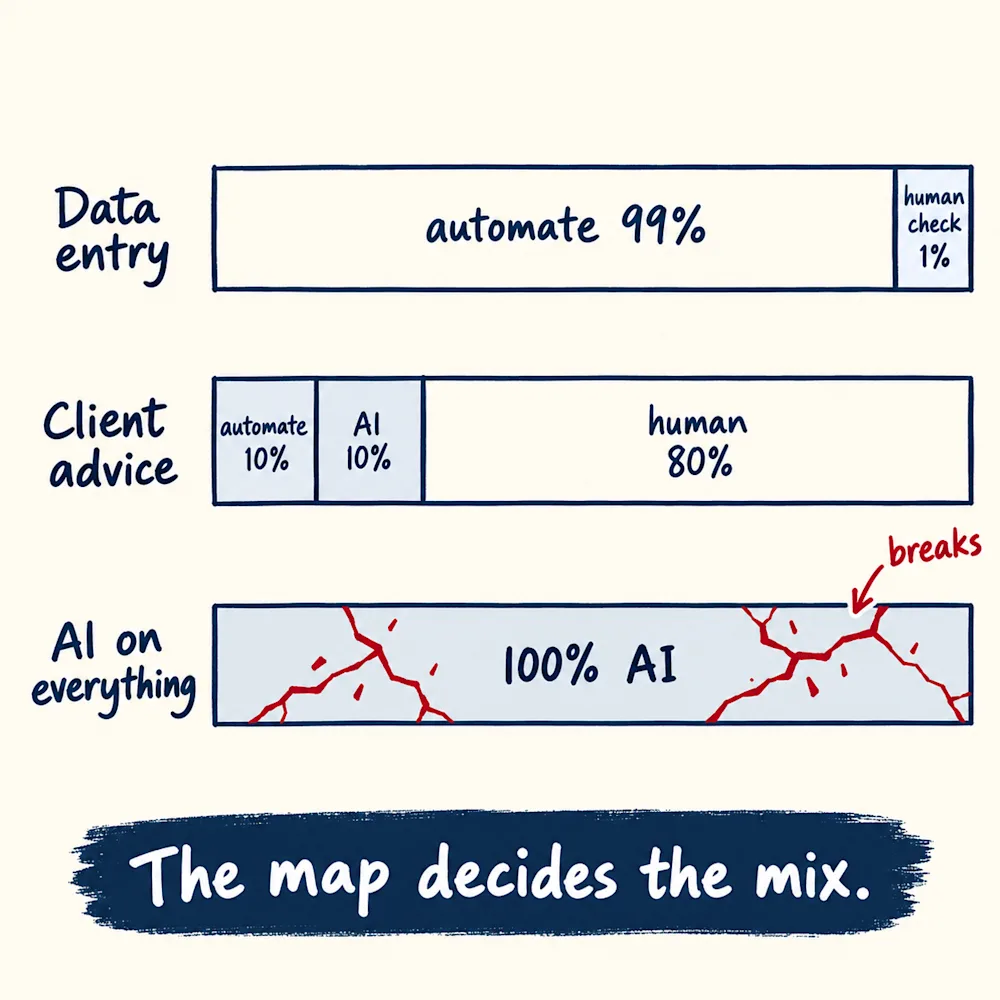
This is the part most AI advice misses. There is no single answer for the whole company. Each process gets its own mix, and the mix can be almost anything. Copying data can be 99% rules with a person checking the result. Advising a client can be 10% rules, 10% AI and 80% people.
Process | Simple rules | AI | People |
|---|---|---|---|
Copying data between systems | Almost all of it | Nothing | A quick check of the result |
Weekly reporting | Pulling and formatting the numbers | A first summary of what changed | Deciding what to do about it |
Advising a key client | Scheduling and reminders | Notes and first drafts | Most of the work |
The drawing decides the mix, not the tool you already paid for.
Where "AI on everything" breaks a business
The expensive mistake is not being late to AI. It is putting AI on everything at once.
Some processes are critical: pricing, the relationship with your biggest clients, anything you sign, promise or answer for. Hand those fully to AI and one confident, wrong answer can cost you a client, a margin or your reputation, with no one in the loop to catch it.
A simple test for every step: if this goes wrong, who answers for it? If the honest answer is you, a person stays in the loop.
What this looked like in our own companies
We ran the same test on our own work before recommending it to anyone.
In our diagnostic work, the data step, cataloguing the documents and running the first cross-checks, used to take weeks. After drawing the process and putting automation and AI on the right steps, it runs in hours. The three places where judgement decides, the hypothesis, the conclusion and the recommendation, stayed with people.
At our agency we did the same for how we find and apply for work on Upwork. We wrote the process down first, as one rule book. Rules now drop the clear no's. AI reads every job post that survives and drafts the application. In one measured run it went through about 350 job posts across twelve saved searches in 27 minutes, and each application took about seven minutes. When a client replies, the conversation is still ours.
Neither started with a tool. Both started with a drawing of the work.
What to do next
Pick one process this week, the one that frustrates you most.
- Draw it with the people who do it, step by step.
- Cross out every step that does not need to exist.
- Mark each remaining step: R for simple rules, AI for AI, P for people.
- Automate the R steps first, then try AI on the AI steps, and leave the P steps with your team.
- Only then decide which tool you need, if you need one at all.
Do one process properly before you touch the next one.
If you want to see where your business stands first, the free business health check takes about four minutes and scores you across clarity, structure, growth and AI. It is the same check those 144 owners took.